Development Update - October 2025
- digitaltinkerllc
- Apr 29
- 6 min read
I hope you all had a wonderful Halloween! This month, we’ve continued the expansion of Space Combat with the introduction of player-controlled squadrons, and have implemented much of the ship management gameplay. As a ship captain, managing your cargo, crew, and officers are just as important to your success as sailing and fighting.
Squadrons
What’s better than commanding a powerful voidship across the stars to glory and fortune? Commanding an entire squadron of them, of course! This month, Isaac spent time implementing the data structures required to support commanding and managing up to four ships. Players can now assign their officers to command ships won through boarding or purchased at a shipyard. Ships in your squadron will help ferry your cargo and assist you in combat. As their commander, you can now order your allies to attack specific targets, hold their position, return to formation, or retreat from combat. Be warned though, an unhappy crew may take the ship and abandon you, or even turn their ship on you!

A player and their squadronmate attempt to trap a pirate corvette in a pincer move
Morale
Speaking of which, we’ve implemented a crew morale system that keeps track of how happy or disgruntled your crew are with your leadership. Things such as recent victories, being paid on time, and having enough Space Rum in the hold will make them happier, while suffering heavy casualties, being unable to pay their salary, or running out of food will cause their morale to plummet. Crews with high morale perform better in combat. Conversely, if their morale remains low enough for long enough, they may mutiny and attempt to seize the ship!
Ship Management
Much of this month was devoted to implementing the functionality of various ship-management menus so that we can finalize our UI artwork in the coming months. (Please note, the screenshots below are fully functional wireframes used for testing, but are not representative of the final look) Most importantly, players can now claim the cargo of ships captured in boarding actions. With the addition of squadrons, players can also assign officers and crew to fly the captured ship, adding it to the player's squadron.
Players now have various ways to manage their ship and squadron. The Crew Quarters screen allows Captains to assign officers to different roles on their ship, unlocking special abilities while underway and making their ship more effective. Having skilled officers also allows the crew to be drilled, improving their effectiveness at sailing and fighting. Captains can also see a detailed breakdown of the various factors affecting their crew’s morale.

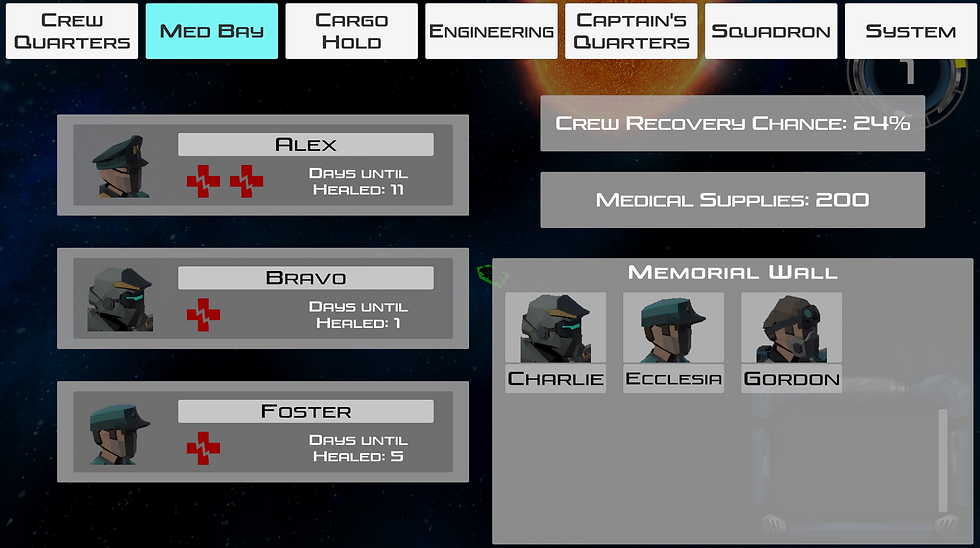
In the Medical Bay, players can see the status of injured officers and inspect their medical team’s ability to recover injured crewmen after battle. There’s also a memorial wall where players can pay their respects to characters lost in the line of duty.
The Cargo Hold is where captains can inspect the quantity, value, and description of items being transported by their ship, and even jettison some to make room for others if needed

The Engineering Bay allows captains to see the status of their ship armor, structure, and engines, ready the special orders they wish to use in Space Combat, and devote time and resources to upgrading systems on their ship to increase performance.

In the Captain’s Quarters, the player can review important messages, check their mission log, or summon officers for a conference.
Finally, the Squadron Management menu allows players to transfer cargo, crew, and officers between ships in their fleet, and set the tactics allied ships will use in combat.
User Interface Art Design
With so much gameplay occurring inside menu systems, it was important to us that the menu aesthetic not just be functional, but also immersive, satisfying, and engaging. To that end, rather than go with a flat, minimalist 2D design found in most Sci-Fi games or apps, instead we are planning for a fully-rendered 3D interface made up of simulated display screens, buttons, levers, knobs, and dials. This will apply to both ship management menus, as well as ground and space combat UI. This way, at all times, the player will feel like they are actually sitting in the Captain’s chair, with information conveyed to them through “actual” monitors and gauges (or their helmet HUD/smart glasses in the case of ground combat), not simply overlaid on the computer screen. Critical damage sustained in combat may even cause some of these displays to malfunction, adding to the feeling of immersion and excitement.
Margo, our UI designer, has begun finalizing the layout of our existing screens and wireframes, ensuring they conform to UX/UI best practices so that we can take them from the current wireframed state seen above to their final rendered implementation. She also began work on our UI Art Kit, which will be used to replace all the grey boxes currently used for buttons and menus in the game.
As always, thank you for your support in making this game a reality. Check out the full changelog below to see all our progress this month.
Best Regards,
Vincent De Tommaso
Game Director
Full Changelog:
Space Exploration
Neutral Ship Interaction - players can now interact with neutral ships they encounter while sailing through the Cortesia System.
Rescale Overworld - resized the overworld to avoid floating point issues
Overworld Passage of Time - time now passes while sailing and is tracked in the UI
Planetary Landing - players can now land on planets
Restrict Overworld Movement at Boundaries - players can no longer fly off forever into the empty void of space beyond the warmth of the system’s star
Repair at Sea - if armor plate and engine parts are available in the cargo hold, the crew will slowly repair damage while traveling through the system (repair rate determined by Engineer’s attribute score)
Space Combat
Ship Status Persistence - the status of your ship now persists after returning from combat, instead of resetting to pristine condition
Reduce Escape Threshold - less distance from enemies is required to flee space combat
Time Dilation - added time dilation options to space combat
Post-Combat Crew Recovery - medical supplies in the cargo hold are expended to give a chance for crew killed in space combat to be saved based on the Medicine skill of your ship’s doctor
Engine HP and Damage Model - Your ship’s engines and maneuvering thrusters can now sustain damage, resulting in decreased maneuverability and acceleration
Accessibility: Ship Status fill color shrinks with damage - in addition to changing color, the ship armor and internal structure status displays will also shrink as they sustain damage, for the benefit of coloblind players
Increase Size of Target UI - increased enemy status display for better readability
Squadron Ship UI - added status displays for ships in a player’s squadron
Squadron Ships Spawn in Combat - ships in a player’s squadron now spawn into combat scenes along with the player
Issue Orders to Squadron Ships in Combat - the player can use the function keys to quickly issue orders to one or all ships in their squadron, such as attacking an indicated enemy, holding position, returning to formation, or retreating
Ship Management
Ship Management Menu - added the infrastructure and navigation bar for the ship management menu
Message Log - added a message log to space combat and the overworld to display messages and status updates to the player
Cargo Hold Menu - added the menu for viewing the items in your cargo hold and added the option to jettison cargo to free up space
Medical Bay Menu - added the menu for the medical bay, where you can see injured officers’ recovery time, crew recovery chance, and medical supplies remaining
Crew Attributes - non-officer crew have navigation, cannoneering, and boarding skill that increases with experience, and makes them more effective over time
Crew Quarters Menu: Assigning Officers - players can assign officers to seven different positions on their ship (navigator, engineer, bosusn, etc.). Having an officer assigned to these positions gives bonuses to the ship and unlocks additional abilities in space combat
Crew Morale - Your crew’s morale now changes based on several factors such as the availability of food and rum, recent victories (or losses), suffering heavy casualties, completing missions, etc. High morale confers bonuses to their performance, and low morale confers penalties (and may even result in mutiny!)
Crew Quarters Menu: Morale Report - The crew quarters menu provides a detailed breakdown of all factors affecting crew morale
Crew Drilling - Assigned officers with sufficient attribute scores can drill the crew to improve their ability at the expense of morale
Engineering Menu: Status Display - displays the status of the Ship’s armor, internal structure, and engines
Engineering Menu: Upgrade Wireframe - allows the player to select and upgrade different rooms and components of their ship
ESC goes back one menu level - with the addition of many submenus in ship management, pressing the ESC key now returns the player back one level, rather than closing the menu entirely
Crew Quarters Menu: Raise Morale Pop-up - captains can pay their crew a bonus for a one-time morale boost
Crew Quarters Menu: Character and Inventory buttons - added buttons to the crew quarters menu to allow quick access to the character and inventory menus
Post-Boarding Victory Screen - after successfully boarding a ship, they player can now claim cargo, or even assign crew and officers to claim the ship as a trophy, adding it to their squadron
Party Selection Screen - When landing on a planet or boarding a ship, the player can choose which officers to bring along with them
Crew Quarters Menu accommodates Squadrons - added a way to change which ship information is displayed for in the crew quarters menu if the player commands a squadron
Implement Squadron Data Structures - created data structures to support player controlled squadrons of ships


Comments